Quick Reference
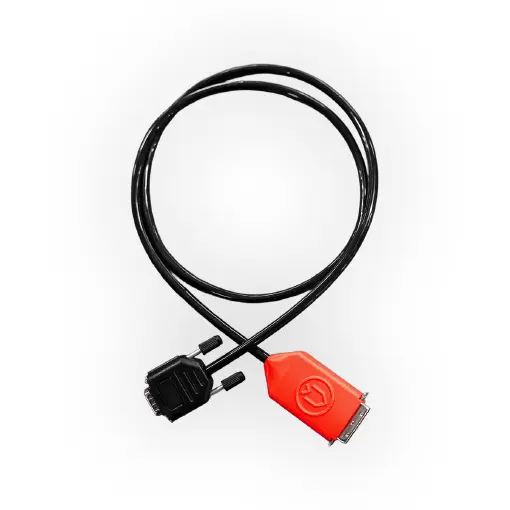
He/O2 Printer cable
version 2026/08/04
#7312
Intended Use
The He/O2 Printer Cable connects the Divesoft He/O2 Analyzer to a compatible label printer.
The cable is powered directly by the analyzer, as indicated by the POWER LED.
A toggle switch on top of the connector allows the printer to charge the analyzer. Active charging is indicated by the CHARGE LED.
Note: When using a battery-powered portable label printer, keep charging turned OFF to conserve the printer's battery life.
System Requirements & Compatibility
✅ Compatible Devices
- He/O2 Analyzer: compatibility varies by Hardware (HW) and Firmware (FW) versions:
- HW 2.3 and earlier ... not supported
- HW 2.4 & 2.5 ... FW 2.41.0 or newer
- HW 4.x ... FW 3.42.0 or newer
- You can update your He/O2 FW using the online tool Divesoft Center
- Printer: ZPLII-compatible Zebra Label Printer (e.g., Zebra ZD421 series).
- Serial Module: Zebra RS-232 Serial Interface Module installed in your printer.
- ZD421 models: Requires Zebra module
P1112640-016. - Older models: Search for the dedicated Zebra serial module for your specific printer model.
- ZD421 models: Requires Zebra module
❌ Incompatible Devices
- SOLO analyzers are NOT compatible with cable #7312.
- DNA and ECHO operate via Bluetooth and supports printers using the Divesoft Mobile App.
Setup
- Power Off: Turn off both the He/O2 analyzer and the Zebra printer before making connections.
- Connect Auxiliary Port: Plug the red multi-pin connector into the Auxiliary Attachment Connector on your He/O2 Analyzer.
- Connect Serial Port: Plug the black DB9 connector into the RS-232 Serial Port on the rear of your Zebra printer. Tighten the side thumbscrews to secure it.
- Power On: Turn on both devices.
- Configure your Analyzer
- On your He/O2 Analyzer, navigate to:
MENU➔PRINTERSetting Parameter Recommended Value Description Printer Mode ONEnables printer communication. Pressing OKduring analysis prints a label.Diver Name Custom (Max 8 chars) Optional name printed on the header of every label. Resolution Match printer DPI Select 203 DPI,300 DPI, or600 DPI(the ZD421t comes in 203 as well as 300 DPI variants).Dimensions Match label media Set width and height to match label size (Maintain a 2:3 aspect ratio).
- On your He/O2 Analyzer, navigate to:
NOTES
- Once setup is complete, restart the analyzer to apply your changes (eg. when changing label resolution).
- If the PRINTER menu does not appear, verify that your firmware (FW) version meets the minimum requirement.
- When Printer Mode is enabled
ON, data output is routed to the auxiliary port, which temporarily disables standard USB output.
Printing
- Analyze Gas: Connect your gas cylinder and take a measurement as normal.
- Trigger Print: Press the
OKbutton on the analyzer while measuring. Result: The analyzer freezes the reading on screen and instantly sends the formatted print job to your Zebra printer.
Docs & Links
Did you know that most printers support printing over the bluetooth as well ?
For more information, including durable, diver-resistant labels see our blog.
Divesoft Blog - Cylinder Labeling
Technical Specifications
| Product Name | Divesoft He/O2 Printer Cable |
| Part Number (PN) | #7312 |
| Operating Voltage | 5V DC |
| Interface / Protocol | RS232 ↔ TTL Serial Signal Level |
| Cable Length | 1 m (approx. 3.3 ft) |
| Weight | 75 g (0.16 lb) |
| Operating Temperature | 0°C to 50°C (32°F to 122°F) |
| Storage Temperature | -10°C to 60°C (14°F to 140°F) |
HE/O2 Analyzer Printer cable - QUICK REFERENCE
Date of issue: 04 August 2026
HW 1.0, FW 2.41.0
Author: Jakub Hečko
Published by Divesoft s.r.o.